Oluwafemi Obajuluwa › Ping
Ping
A self-hosted WhatsApp bot. Send it a link and it replies in the same chat with the video, the photos, or a picture of the post.
2026 · WhatsApp · Built with Bun, TypeScript, ffmpeg, WhatsApp, Docker
Someone drops a tweet in the group chat and everybody has to leave to read it. You open X, wait for it to load, read four lines and come back. Reels and TikToks are worse, because half the time the app wants you signed in before it will show you anything at all.
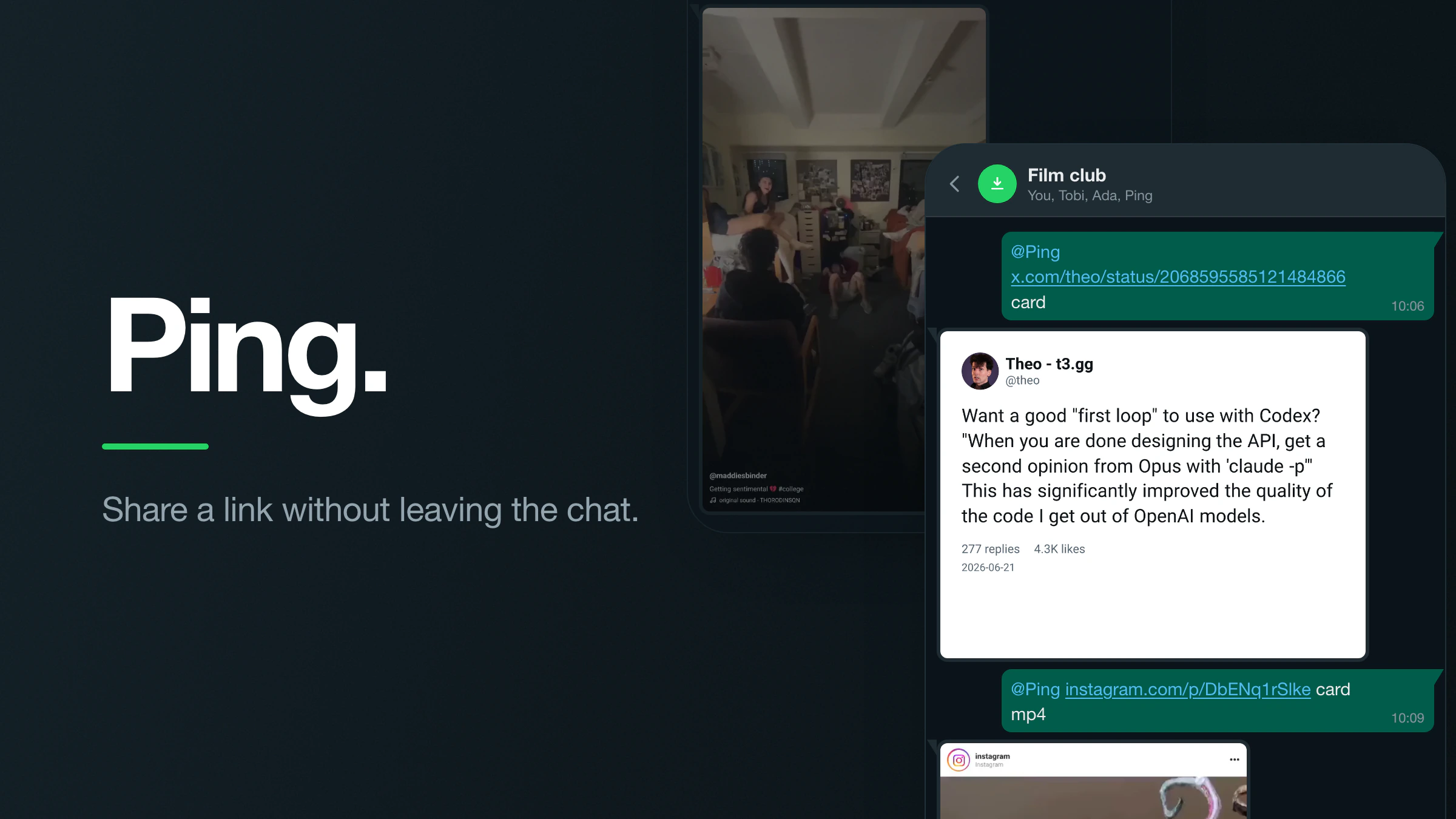
Ping is a WhatsApp account I run that answers that problem in the chat it came up in. You send it a link and it replies with the thing itself. Sometimes that is the video or the photos. Sometimes it is a picture of the post with the avatar, the name, the text, the likes and the date still attached, so you can see who said it and when without going anywhere.
It runs in a Docker container on a VPS I already pay for, connected to a spare WhatsApp number. There is nothing to sign up for. It is one repo, and you can run your own copy on your own number.
Every reply from Ping shown here is real bot output. The links were run through the command line version, and the files it wrote are the files you see here. Posts belong to their authors.
- echoeyecodes/wa-ping-downloader · GitHub
What you send it
Ping reads your message, takes the first link in it and downloads what is behind that link. Everything else is a word you can put anywhere in the same message, in any order, because it looks for the words rather than parsing a command.
A link on its own gives you the media. A tweet with a video gives you the video. A post with several photos comes back as one album instead of five separate messages. Add mp3 and you get audio. Add card and you get a picture of the post instead of what was in it.
- a link on its own: the media behind it, video by default
mp3: audio instead of videocard: a picture of the post as it looks in the appcard mp4: the same card with the clip playing inside itcard mp4 quote: play the quoted tweet's videocard mp4 parent: play the video in the tweet being replied tocard mp4 og: play the video in that tweet's own quote
Here's the same Instagram link sent twice. First on its own:
instagram.com/p/DbENq1rSlke
Then with card mp4 on the end, which keeps the account, the likes and the caption around it and plays the clip in place:
instagram.com/p/DbENq1rSlke card mp4
Cards
A card is a drawing of the post rather than a screenshot of one. Nothing opens a browser and nothing takes a picture of a screen.
For tweets, the text, the media, the counts and the date come from the endpoint that the official embed widget uses. It is public, so there is no login and no account involved. Instagram goes through gallery-dl, which does need your own cookies. TikTok goes through yt-dlp, which does not need anything.
The drawing itself is done by Satori. You give it a tree of elements with flexbox rules on them and it hands back an SVG. resvg turns that SVG into a PNG at twice the size, and the PNG is what arrives in the chat. Because it is a layout engine rather than a template, a long tweet and a short one both come out looking right.
@Ping x.com/theo/status/2068595585121484866 card
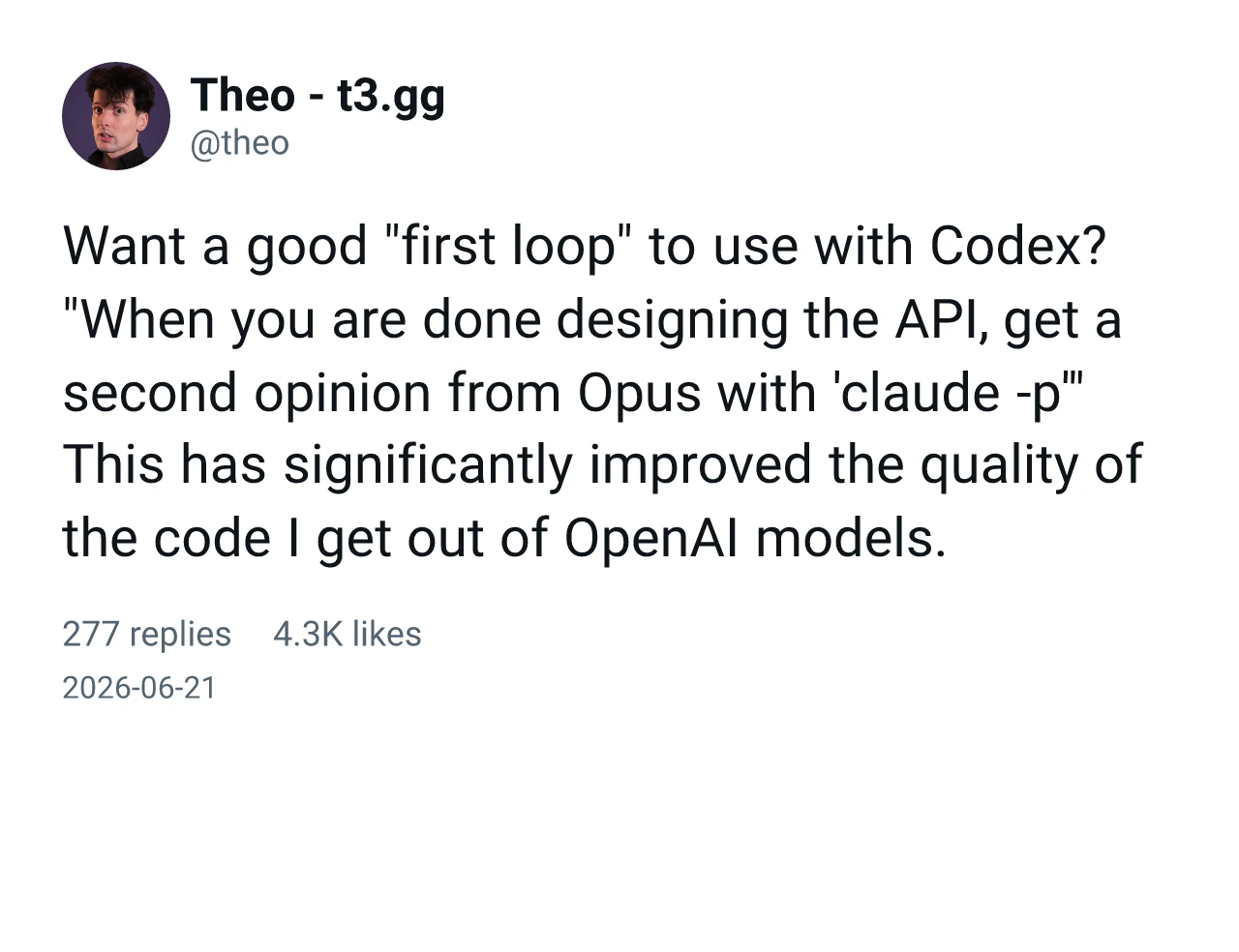
The reply is a PNG, so it behaves like any other photo in the chat: it can be forwarded, saved, or replied to.
Replies and quotes
A tweet is often only half of what is being shared, so the card draws the other half too.
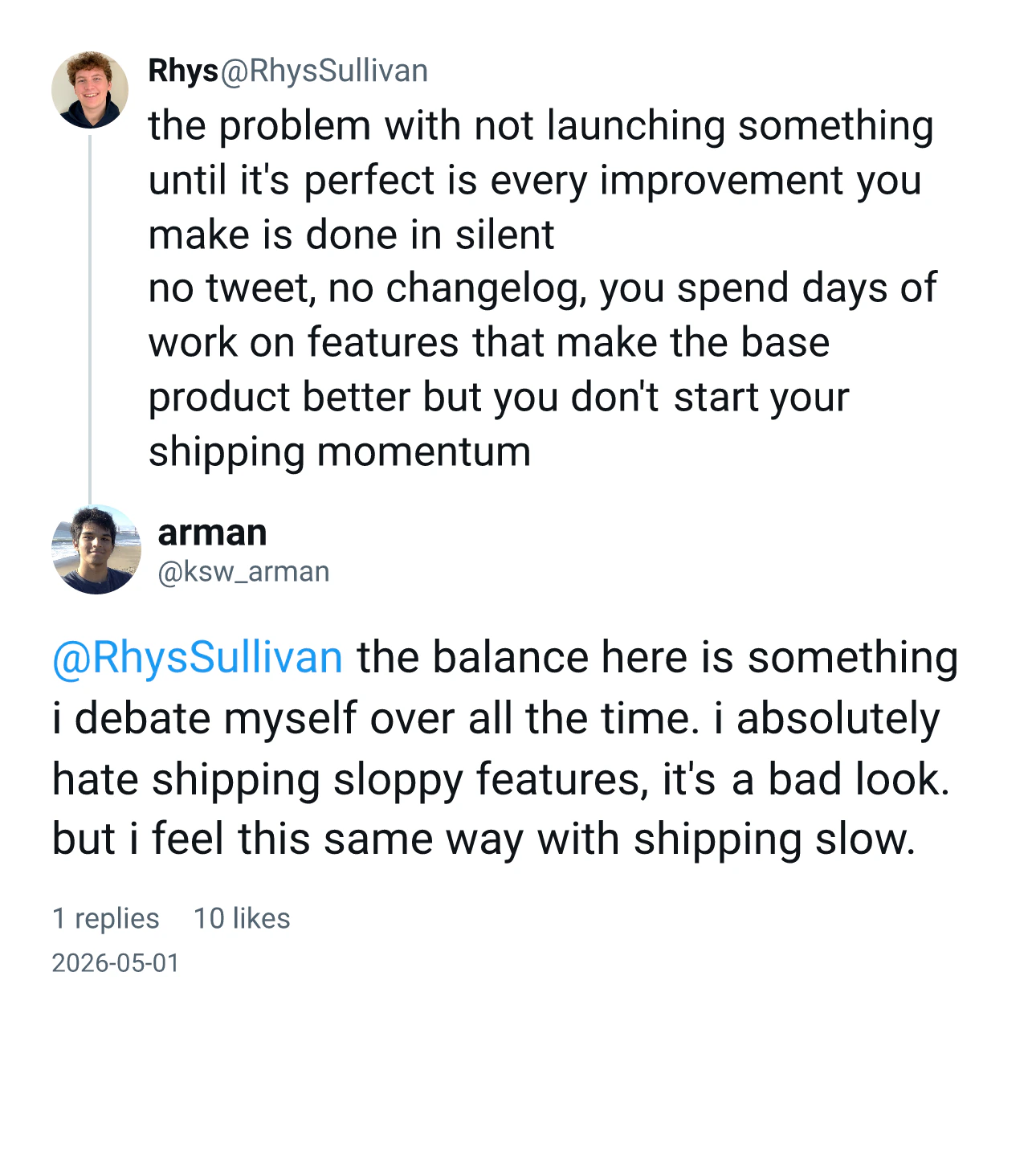
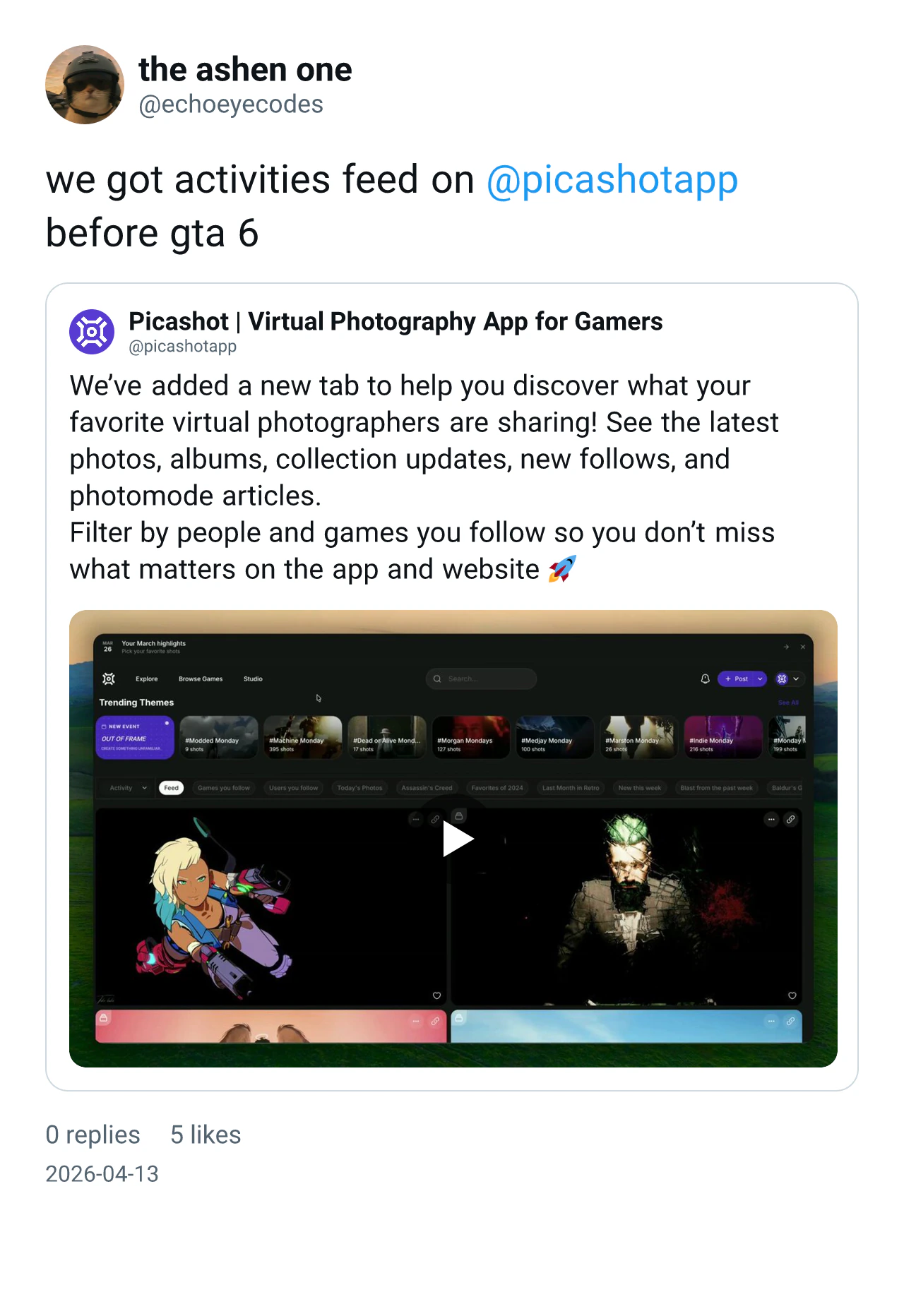
If the tweet is a reply, the card puts the tweet it answers above it with the thread line running down the left, the way X shows it. If it quotes another post, the quoted post gets its own box inside the card. If it is a reply to a tweet that itself quotes something, all three appear in one picture, each one set in a narrower column than the one above so the nesting is easy to follow.
@Ping x.com/ksw_arman/status/2050278344990531956 card
@Ping x.com/echoeyecodes/status/2043716117894397960 card
Video in cards
A still card of a video post is a still of a video, which is only half useful. Adding mp4 to a card message gives you an mp4 instead, where the clip plays inside the card while the header, the text, the likes and the caption stay put around it.
The awkward part is knowing where in the finished picture the video belongs, because that position depends on how the layout turned out. So the layout answers the question itself. Where the video should go, it puts a solid rectangle in one colour that nothing else in the card uses. Once Satori has produced the SVG, the code finds the rectangle with that fill and reads its position and size straight off it.
Then ffmpeg scales the clip to that box, crops it to fit, and lays it over the still card for as long as the clip runs. The measurement is never done twice, so a card whose layout shifts cannot get a video in the wrong place.
One tweet can hold up to four videos: its own, its quote's, the one it replies to, and that tweet's quote. Ping plays the first one it finds, in that order. If you want a different one, say which: quote, parent or og.
@Ping x.com/TheeMagda/status/2086161133350653985 card mp4
This tweet has no video of its own. The one playing belongs to the post it quotes, which is the first video Ping found and so the one it used.
Reels and TikToks
Instagram cards are built the same way as tweets: header, media, actions, likes, caption, date, with the clip dropped into the media slot.
TikTok is built the other way round, because the video is the whole frame there and the interface sits on top of it. So the card is rendered on a transparent background, and ffmpeg puts the clip underneath it rather than inside it. The rail, the caption and the sound line end up over the video, which is where they are on TikTok.
@Ping tiktok.com/@maddiesbinder/video/7362269092528557355 card mp4
Permissions
The account is a WhatsApp account, so it can see every chat the number is in. Two settings decide what it acts on.
PING_DMS covers direct messages, and is one of anyone, self for your own chat with yourself, or off. PING_GROUPS covers groups, and is one of mention, all or off. It ships on mention, which means the bot sits quietly in a group until someone tags it.
It also ignores anything sent before it started. WhatsApp delivers a backlog when a device reconnects, and without that check a restart would download every link from the last hour again.
PING_DMS: anyone, self, or offPING_GROUPS: mention, all, or offGALLERY_DL_COOKIES_B64: login cookies, Instagram and YouTubeLINK_TOKEN: the secret that opens the pairing pageWA_AUTH_DIR: where the WhatsApp session is kept
Pairing
WhatsApp links a device by QR code, which is easy on your laptop and annoying on a server. The first version printed the QR into the container logs, so relinking meant opening a shell on the box with a phone in the other hand.
Now the bot serves one page of its own. Set LINK_TOKEN to a secret and it listens on /link?token=..., so giving the container a domain is enough to reach it. The page shows the current QR, refreshes itself every five seconds, and says “Linked” once the scan goes through. Without a token it serves nothing and falls back to the logs.
WhatsApp unlinks devices on its own sometimes. When that happens while the bot is running, it clears the dead session and goes back to showing a QR by itself, so relinking is opening a URL rather than redeploying anything. The one thing to get right is keeping the session folder on a volume, because a fresh container without it means pairing again after every deploy.
Self-hosting
It needs Bun, yt-dlp, gallery-dl and ffmpeg on the machine, or the Docker image, which has all four in it already. Copy .env.sample, run the container, open the link page once, and it is yours.
Instagram needs your cookies to download anything, and YouTube asks for them too when the request comes from a datacentre address. There is a script that takes a cookies.txt export, throws away every line that is not Instagram or YouTube, and encodes what is left into the env file. Use a throwaway Google account for the YouTube half, because cookies used from a server IP can get an account flagged.
How it's built
- Bun, TypeScript: one process, no build step
- Baileys: talks to WhatsApp as a linked device
- yt-dlp: video and audio, most sites
- gallery-dl: photos, and Instagram posts
- ffmpeg: merging, converting, compositing
- Satori, resvg: card layout to SVG to PNG
- X syndication API: tweet text, media, quotes, replies
- Docker, GitHub Actions: build on push, redeploy on the VPS
- echoeyecodes/wa-ping-downloader · GitHub